
We’re excited to announce Members Only v1.4.0! This release focuses on improving communication with your members and making the plugin even easier to set up.
What’s New
Email Notifications
The headline feature of v1.4.0 is customizable email notifications. Your members can now automatically receive emails when important subscription and payment events occur — keeping them informed, reducing support requests, and reducing churn.
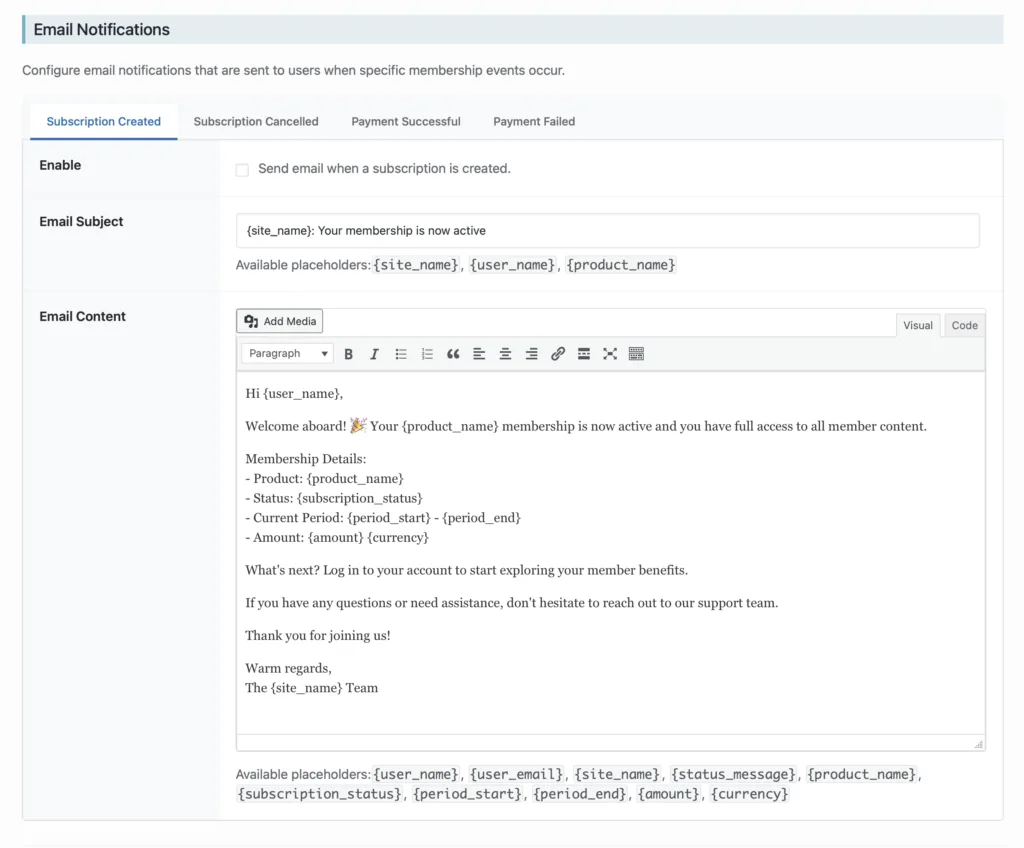
Click image to enlarge
You can enable notifications for four key events:
- Subscription Created – Welcome new members the moment they sign up
- Subscription Canceled – Confirm cancellations and remind members they still have access until their current paid period ends
- Payment Successful – Send receipts when renewal payments go through
- Payment Failed – Alert members immediately so they can update their payment information
Each notification is fully customizable. You can edit the subject line and email content using placeholder tags like {user_name}, {product_name}, {amount}, and more. The intuitive tabbed interface makes it easy to configure each email type.
To get started, head to Settings → Members Only and scroll down to the Email Notifications section.
One-Click Account Page Setup
Setting up your membership site just got faster. We’ve added a “Create New Page” button directly on the settings page. Click it, enter a page title, and Members Only will automatically create the page and assign it as your Account page. No more switching between tabs or manually configuring page settings.
Test Webhook Signing Secret
For developers and site owners who want to test Stripe webhooks while running in Live mode, we’ve added a dedicated Test Webhook Signing Secret field. This makes it easier to debug and test your integration without affecting your production environment.
How to Update
If you have automatic updates enabled, you’ll receive v1.4.0 automatically. Otherwise, head to Plugins → Installed Plugins in your WordPress admin and click “Update” next to Members Only.
Getting Started with Email Notifications
- Go to Settings → Members Only
- Scroll to the Email Notifications section
- Click on a notification type (e.g., “Subscription Created”)
- Check the Enable checkbox
- Customize the subject and content as needed
- Save your settings
We recommend enabling at least the Subscription Created and Payment Failed notifications — they provide the most value for both you and your members.
Questions or Feedback?
We’d love to hear how you’re using email notifications! If you have questions, feature requests, or run into any issues, contact our support team or check out the documentation.
Happy membership building!